Instagram photo downloader tool is a service to save Instagram photos with fast, secure and in HD formats without password. Instagram photo downloader works fast and secure to protect your safety and privacy.
Want to download your favorite photos from Instagram quickly and securely? With Famety Instagram Photo Downloader you can save high quality photos to your device. We will explain in detail how you can download Instagram photos and why you should choose Famety.
What Is an Instagram Photo Downloader and How Does It Work?
With Famety’s Instagram Photo Downloader you can easily download photos in high resolution without apps. Our tool is fast and secure to help you save your favorite Instagram images. Instagram Photo Downloader is an online tool that helps you download photos on Instagram to your device. Our tool is quite simple to use. You just copy and paste a photo link into Famety's toolbox and you can complete the download in seconds. It's important to save photos because if Instagram deleted your photo you should also know what happens after your content disappears.
How Does It Work?
You can download any photo on Instagram easily by following the steps below.
Copy the Instagram photo’s link
Paste it into our downloader tool
Click download and save the photo in high resolution
It’s that easy! No softwares, no logins and no complicated steps. Just an easy way to download IG photos anytime you want.
Why Use Famety to Download Photos from Instagram?
Famety offers one of the best Instagram Photo Downloader tools that stands out for its reliability and ease of use. Our tool allows you to save Instagram photos directly to your device without the need to download any additional software.
- We offer 100% secure downloads.
- You can save the photos in high quality.
- You don’t need to install anything everything is online.
- Our tool is compatible with all platforms.
- We don’t store or track any user data.
Is It Free to Download Photos from IG?
Yes, Famety Instagram Photo Downloader is completely free. Users can quickly and securely download the Instagram photos they want at no cost. Our tools are here to help you grow on social media!
Step-by-Step Guide to Download Instagram Photos on PC
You can follow these steps to download Instagram photos to your PC.
Step 1 Copy the Instagram Photo Link
We offer simple steps for downloading photos.
Open Instagram on your browser.
Find the photo you want to download.
Click the three dots on the top right of the post.
Select 'Copy Link'.
Step 2 Paste the Link into Famety's Downloader
You can continue downloading by following the steps below.
Open Famety’s Instagram Photo Downloader in your browser.
Paste the copied Instagram link into the search bar.
Step 3 Click Download and Save the Photo
The last step is the easiest way to save Instagram photos.
1. Click the 'Download' button to process the image.
2. The photo will be displayed click 'Save' to store it on your device.
Step-by-Step Guide to Download Instagram Photos on Mobile Devices
You can follow these steps to download Instagram photos from your mobile devices.
Step 1 Open the Instagram Post on Your Mobile
Download process is similar to Pc version.
1. Open the Instagram app on your phone.
2. Navigate to the photo you want to download.
Step 2 Copy the Photo's Link
All you need is the link of the Instagram post.
Tap the three dots on the top right of the post.
Select 'Copy Link'.
Step 3 Use Famety's Mobile Friendly Downloader Tool
You can complete your download process on mobile easily.
Open your mobile browser and go to Famety’s Instagram Photo Downloader.
Paste the photo link into the search box.
Click 'Download' and save the image directly to your phone.
How to Download Instagram Posts on PC
Step 1
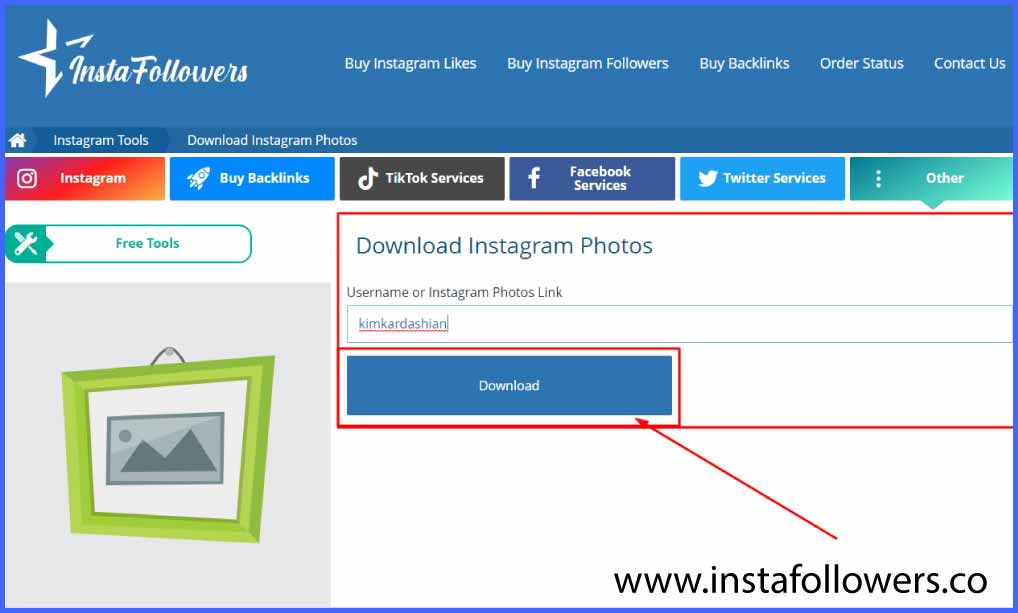
Enter the photo link or Instagram username you want to the link box. If you do not know how to get the URL of a photo on Instagram open the post on Instagram on a browser and copy the URL on the address bar.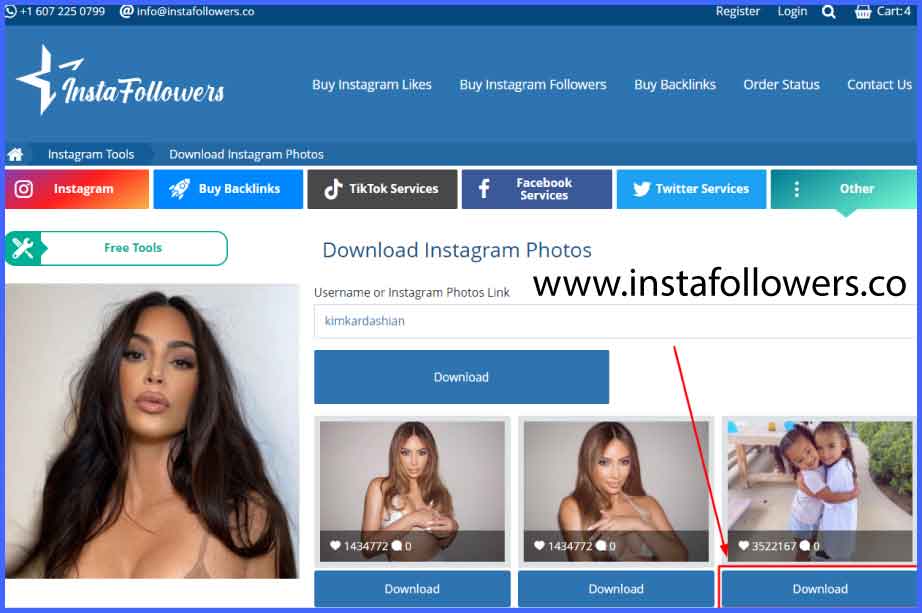
Step 2
After pasting the link or username successfully click the 'Download' button. You will see the list of Instagram posts (photos) of the user as soon as possible. View the image(s) and choose the ones you want to have.

Step 3
If you want to download an image click on the download button under it and it will open in a new tab automatically. Right click on the image and click on the 'Save image as...' option.
How to Download Instagram Posts on Mobile Devices?
Step 1
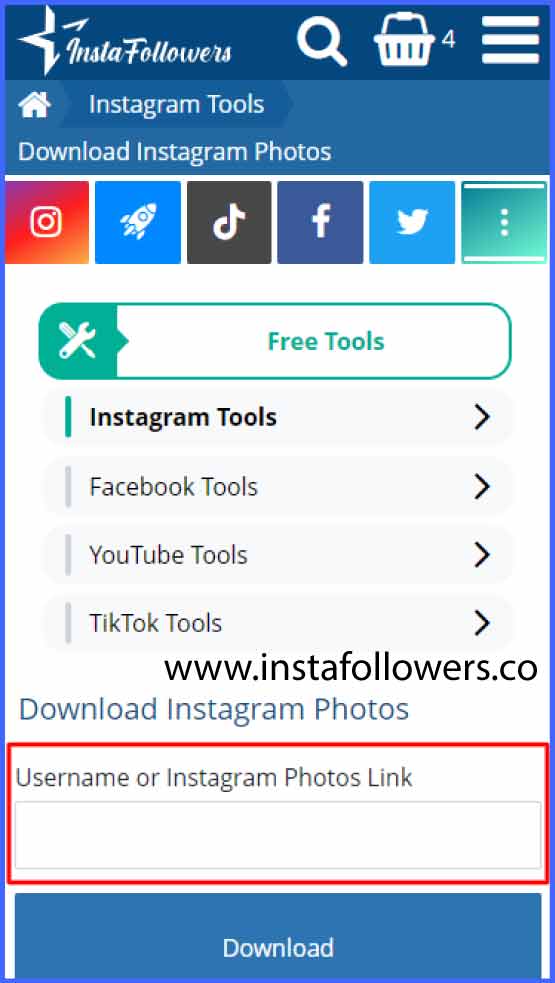
After entering our site from your mobile device enter the username of the Instagram user whose photo you want to download in the field above.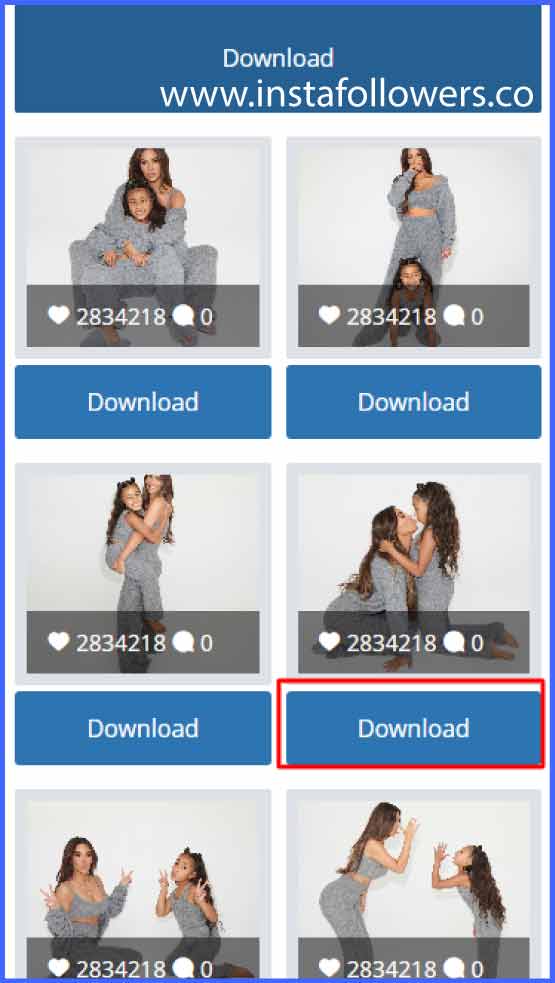
Step 2
Then, select one of the posts and click the 'Download' button. The post you want to download will open as a new tab.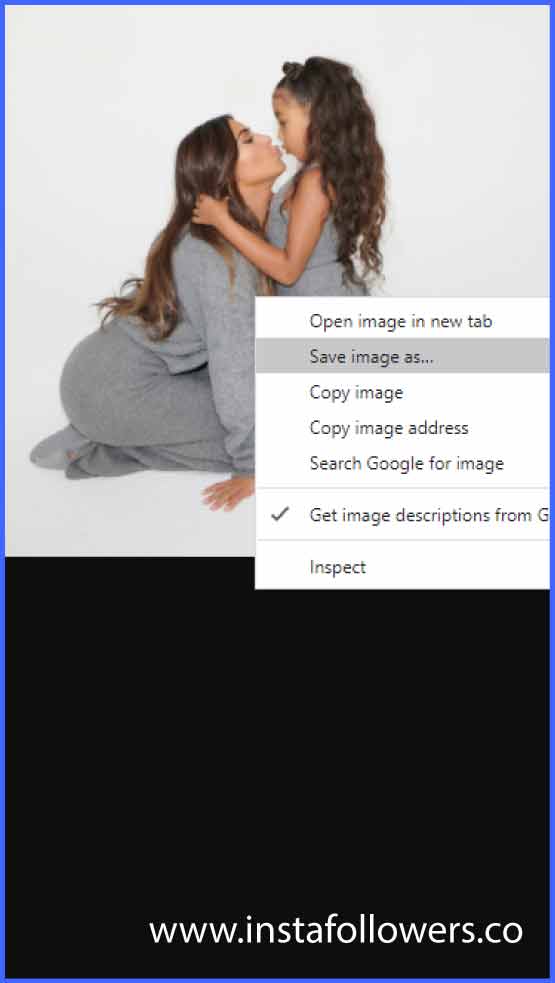
Step 3
Click and hold on to the photo in the new tab and click 'Save image as ...'. That's all you need to do!Our servers work with the latest technology but in some circumstances there may be minor technical problems. One of the biggest reasons is the high demand resulting in a high load on our servers. Many people download photos at the same time which can create problems in the system and you may see some error messages. If you experience a problem like this wait for a short while and try again. If the problem still occurs contact us. Our WhatsApp customer care service is 24/7 online.
We hope you like our service. For any questions or problems our WhatsApp customer care service is 24/7 online and ready to assist you.
How to Use Instagram Photo Downloader


Enter your Instagram username or photos link.
Click on the 'Download' button.
Complete the Captcha process.
Your photo will be open in a new window. Click the right mouse and choose 'save image as' option.
Done! Enjoy your Instagram photos.
Frequently Asked Questions
Is there a limit on how many photos I can download?
There’s no official limit for downloading photos from public Instagram profiles, but free web-based tools usually handle one link at a time. For batch downloading, you may need a premium tool or script. Always use these responsibly and avoid scraping too much at once.
Can I download someone’s private Instagram photos?
No — you can’t download photos from private Instagram accounts unless you’re an approved follower and can see the content. Even then, many downloaders won’t work for private profiles because they rely on public URLs. Respect privacy and never share private photos.
Is it legal to download Instagram photos?
Downloading someone else’s photos without permission may violate Instagram’s Terms of Service and copyright law. Saving your own photos is always allowed. If you download public photos, use them fairly and always credit the original creator if you share them elsewhere.
Is it possible to download Instagram carousel posts?
Yes! A good Instagram photo downloader can handle carousel posts, which include multiple images or videos in one post. Some tools download all carousel slides in one zip file. Be sure the downloader you choose supports multi-image posts if you need this feature.
Do Instagram photo downloaders work with Reels cover photos?
Yes — many updated Instagram downloaders let you save Reels cover images as well. When you paste the Reels link, you can often choose whether to download the video or just the cover photo thumbnail, which is useful for mood boards or repost design ideas.
Do downloaded Instagram photos have metadata?
Instagram strips most EXIF metadata like camera settings or location when you upload a photo. So, downloaded images usually won’t include that original file info. You’ll only have the basic image file. Always save originals separately if you need the full metadata.
Can I download photos from Instagram Business Accounts?
Yes — if the business account is public, you can download its photos just like any regular account. Many brands use business accounts to share high-quality visuals. Always credit the brand or creator if you reuse any photos for marketing, inspiration, or reposting.

 00:
00: