Editing a TikTok video after posting is not supported by TikTok’s native features, yet creators still need reliable ways to fix captions, clips, or optimization mistakes without damaging reach.
This guide explains what you can and cannot edit after posting, outlines working solutions in 2026, and shows how to repost strategically without losing performance.



Can You Edit a TikTok Video After Posting?
TikTok does not allow direct edits to a published video.
Once a video is live, the footage, audio, effects, and text overlays are locked and cannot be modified on the original post.
This limitation applies to:
- Video clips
- Background music or sounds
- Filters and visual effects
- On-screen text
However, TikTok users still have effective workarounds that allow corrections while maintaining content quality and algorithmic trust.
What You Can Do Instead
Editing a TikTok after posting requires replacement or concealment, not modification.
Available options include:
- Re-uploading a corrected version
- Editing captions before posting via drafts
- Hiding the video using privacy settings
- Re-editing the video externally and reposting
Each method solves a different problem, depending on whether the issue is visual, textual, or strategic.
Why Creators Need to Edit TikTok Videos After Posting
Creators search for how to edit TikTok videos after posting because publishing mistakes are common.
The most frequent reasons include:
- Caption typos
- Missing or incorrect hashtags
- Uploading the wrong clip
- Poor lighting or audio quality
- Missed TikTok SEO opportunities (keywords, trends, sounds)
Each issue impacts discoverability, watch time, and credibility, which makes correction essential.
Method 1: Re-Upload a Corrected Version (Most Reliable)
Re-uploading is the only way to truly “edit” a TikTok video after posting.
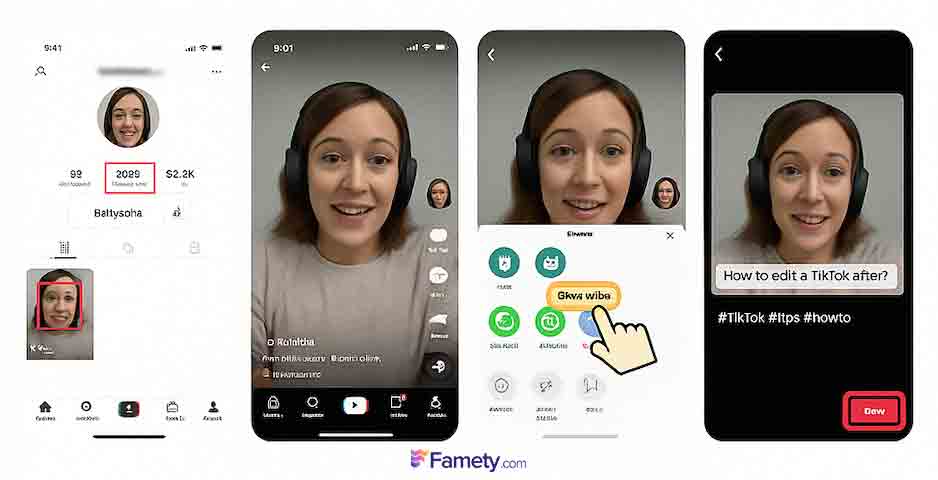
Step-by-step process:
- Open your profile and select the video
- Tap ••• → Save video
- Delete the original post if necessary
- Upload the saved video again
- Add a corrected caption, hashtags, and tags
- Post the new version
Reposting replaces errors while allowing full re-optimization, including captions, keywords, and calls to action.
Pro tip:
If the original video already has strong engagement, leave it live and repost the corrected version with a clear caption such as “Updated version” or “Fixed caption”.
Method 2: Edit Captions Using Drafts (Before Posting)
TikTok drafts allow unlimited editing before a video goes live.
How drafts work:
- Drafts store videos locally on your device
- Captions, music, filters, and effects remain editable
- Posting from drafts publishes the final version only
Steps:
- Record your video
- Tap Next, add a caption
- Select Drafts instead of Post
- Open Drafts and tap Back
- Edit text, hashtags, music, or visuals
- Publish when ready
Drafts are ideal for content scheduling, caption testing, and SEO refinement.
Method 3: Hide the Video Using Privacy Settings
Privacy settings allow temporary removal without deletion.
Steps:
- Open the video
- Tap ••• → Privacy settings
- Set visibility to Only Me
This method prevents audience confusion while you prepare a corrected repost.
Advanced Method: Re-Edit with External Tools
External editors provide higher control than TikTok’s native tools.
Common use cases include:
- Lighting correction
- Audio synchronization
- Accessibility captions
- Transitions and overlays
Recommended tools:
- CapCut (TikTok’s official editor)
- InShot
- Adobe Premiere Rush
- Canva (caption-focused edits)
After editing:
- Export the final version
- Upload as a new TikTok post
How to Avoid Editing Mistakes in the Future
Preventing errors is more efficient than fixing them.
Pre-post checklist:
- Spell-check captions
- Add trending and relevant hashtags
- Review TikTok Community Guidelines
- Include a clear CTA
- Choose a high-contrast cover image
This checklist reduces repost frequency and protects reach.
TikTok SEO Tips When Re-Uploading
Reposting is an opportunity to improve discoverability.
Optimize by:
- Including the main keyword in the caption
- Example: “How to edit a TikTok video after posting”
- Example: “How to edit a TikTok video after posting”
- Adding related hashtags
- #TikTokTips #EditAfterPosting #RepostHack
- #TikTokTips #EditAfterPosting #RepostHack
- Using bold or clear text overlays like “Updated Version”
Common Mistakes to Avoid
Incorrect reposting damages performance.
Avoid:
- Deleting and re-uploading repeatedly
- Changing video content but keeping the same caption
- Reusing the same cover image
- Ignoring analytics before removal
Does Reposting Affect TikTok Performance?
Reposting affects reach, but not always negatively.
When done correctly:
- Visibility can improve
- SEO alignment increases
- Timing issues are corrected
Many creators intentionally repost underperforming videos with improved captions and keywords.
Final Thoughts
TikTok does not support direct video editing after posting, but creators still have full control through reposting, drafts, privacy settings, and external editors.
Using these methods strategically ensures content accuracy, professional presentation, and long-term growth.
If I edit my TikTok videos after they are posted, does it reduce their chances of appearing on the For You page?
Editing a TikTok after it’s posted by deleting and re-uploading does not directly reduce your chances of appearing on the For You Page. What matters most is how well the new upload performs in its first moments: watch time, retention and engagement. Strong early interaction leads to more TikTok views. However, repeatedly deleting and reposting in a short period can confuse the algorithm, so make edits carefully and repost only when truly necessary.