- You can change the email on your TikTok account from both the app and a computer by accessing account settings and verifying identity.
- TikTok sends verification codes to both your old and new email to prevent unauthorized changes.
- Always use an accessible and secure email to help with login and account recovery.
- Keeps your account safer by updating your email whenever your primary address changes.
Updating the email linked to your TikTok account may seem simple, but there are a few details that many users overlook. Your email is a core part of your login and security. It can help you recover your account if you forget your password or if someone tries to access it without your permission. Knowing how to change it properly can save you frustration later.
Yes, you can change the email on your TikTok account. This process requires that you access your settings, verify your identity, and enter a new email address that you have access to. TikTok will send verification codes to both your old and new emails during the process to ensure it is really you making the change. Both addresses must be active for the process to complete successfully.
In this article, we will explain why you may want to update your email, how to change it using the app, how to do it from a computer, and what to do if you can no longer access your old email.
Why You Might Want to Change Your Email on TikTok
Your email address is connected to many important aspects of your TikTok account. Here are a few common reasons people choose to update it:
- Security reasons: If your current email is compromised or you suspect unauthorized access, changing your email helps protect your account.
- Lost access to old email: If you no longer use the email on your account, updating it prevents you from being locked out in the future.
- Professional or personal updates: You may have a new primary email you prefer to use for all your digital accounts.
- Password recovery: A current and accessible email makes it easier to recover your password if you forget it or if TikTok detects suspicious activity.



Keeping your email up to date improves account safety and ensures you receive TikTok notifications like new followers, security alerts, and recovery options when you need them.
How to Change Your Email Address in the TikTok App
Changing your email in the TikTok mobile app is the most common method for most users. Here is a clear step-by-step process that works on both Android and iOS:
- Open the TikTok app on your device.
- Tap the Profile icon at the bottom right of the screen.
- Tap the Menu (three lines) at the top right to open settings.
- Select Settings and privacy.
- Tap Account or Manage account.
- Tap Email to see your current address.
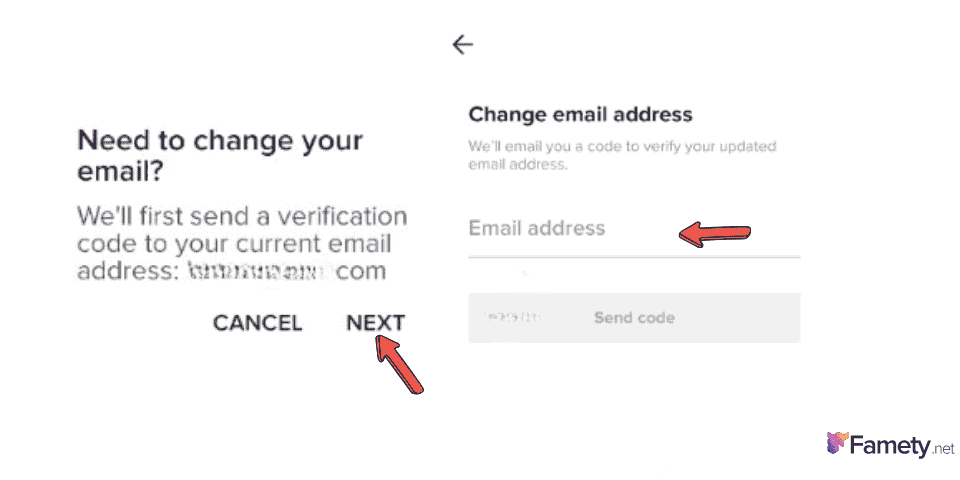
- Choose Change email.
- Enter your new email address.
- TikTok will send a verification code to your new email.
- Enter the code to confirm the update.
After you complete these steps you should see your new email listed in your account. This new address will be used for login processes, password resets, and security alerts going forward.
How to Change Your TikTok Email on a Computer
Sometimes users prefer to update their account settings from a laptop or desktop. This is especially useful if you cannot access the TikTok app:
- Visit the official TikTok website and log in with your account.
- Click your Profile icon in the top right corner to open your profile page.
- Click Edit profile or Account settings.
- Look for the Email field showing your current email.
- Click Change email and enter your new address.
- TikTok will send a verification code to your new email.
- Enter the code to complete verification.
Be sure to check your inbox and spam or promotions folder if you do not see the code immediately.
What Happens During Email Verification
When you change your email TikTok will send a verification code to the address you are trying to remove and to the new one. This double-verification process ensures that you are really the owner of both addresses and prevents unauthorized changes.
Until you complete both steps the email will not be fully updated. This helps prevent someone from stealing access to your account by entering a fake or incorrect address.
What to Do If You Can’t Access Your Old Email
Sometimes you may need to change your email but you no longer have access to your old address. In these cases follow these steps:
- Try to recover the old email first if possible.
- Add a mobile phone number to your TikTok account under settings.
- Contact TikTok support for assistance if you cannot verify your identity.
- Provide any recovery information you have available.
TikTok may ask you to verify your identity with photos or other account details before allowing the email change without access to the old email.
Why Email Changes Can Affect Account Security
Your email is tied to password reset options and to security features like two-factor authentication. Keeping it updated helps you stay in control of:
- Login notifications
- Password reset requests
- Verification alerts
- Account recovery processes
Failing to update the email when you lose access to it can make it difficult or impossible to regain access if you are locked out of your account.
Tips for a Safe Email Update
Here are some best practices when changing your TikTok email:
- Always use a personal email that only you control.
- Use an email from a reputable provider like Gmail or Outlook.
- Enable two-factor authentication for additional security.
- Keep a record of verification codes or use an authenticator app.
These precautions help protect your TikTok account from unauthorized access and ensure your login credentials remain secure.
Can You Use the Same Email for Multiple Accounts?
TikTok allows each email address to be linked to only one account at a time. This means you cannot use the same email on two different TikTok accounts simultaneously. If you need separate emails for separate accounts you must use different email addresses.
When You Should Not Change Your Email
There are also times when you might want to hold off on updating your email:
- If you are logged into essential services using your current email.
- If your email provider is experiencing access or delivery issues.
- If you are actively running important campaigns or logins that rely on your current address.
In these situations it may be better to wait until you have secure access to both old and new email accounts before making the switch.