- Instagram may log users out due to security alerts, multiple device sessions or suspicious login activity.
- Outdated apps, corrupted cache data and third party tools are common technical causes of forced logouts.
- Resetting the password and removing unknown devices often fixes recurring session problems.
- VPN usage and unstable internet connections can also trigger automatic logout behavior.
- Following proper account security steps helps prevent future unexpected logouts.
If Instagram keeps logging you out over and over again, you’re not alone and you’re definitely not crazy. Thousands of users experience this issue every day. Whether it’s happening once a week or five times a day, getting kicked out of your account is frustrating and confusing. So, why does it happen? And more importantly, how do you fix it?
In this guide, we’ll walk you through the most common reasons why Instagram keeps logging you out and what you can do to solve it for good.
The Most Common Reasons Instagram Logs You Out
Before jumping into solutions, let’s break down the most typical causes behind this problem.
Instagram App Bugs or Glitches
App bugs are more common than you think. If you’re using an outdated version of Instagram, or if there’s a known bug, you might experience log-out issues. Instagram regularly pushes out updates to fix such bugs.
Suspicious Login Activity



Instagram has strong security filters. If the app detects multiple logins from different locations or devices, it may log you out as a safety precaution. Even using a VPN can sometimes trigger this.
Account Synced on Too Many Devices
Have you shared your account with someone? Or maybe you’re logged in on multiple devices (phone, tablet, browser)? If Instagram sees that your session is active in too many places, it might auto-log you out to prevent account abuse.
Password Changed Recently
If your Instagram password has been changed (by you or someone else), the app will log you out of all sessions. This includes other devices where you previously stayed logged in.
Third-Party Apps or Bots
Using automation tools or unauthorized third-party apps can put your account at risk. Instagram’s systems might detect it and automatically log you out or even restrict your account. If you want to grow Instagram followers safely you should choose a reliable provider.
How to Stop Instagram From Logging You Out
Let’s get straight to the point. Below are the most effective ways to stop Instagram from logging you out repeatedly.
Update the Instagram App
This is the easiest and fastest fix. Go to the App Store or Google Play and check for updates. A new version might solve hidden bugs causing the logout loop.
Clear App Cache & Data (Android Only)
If you’re on Android, clearing Instagram’s cache can help.
- Go to Settings > Apps > Instagram
- Tap on Storage & Cache
- Tap Clear Cache and then Clear Data
Clearing data will require you to log back in.
Reset Your Instagram Password
If someone else has your login, they could be logging you out. Change your password immediately to secure your account.
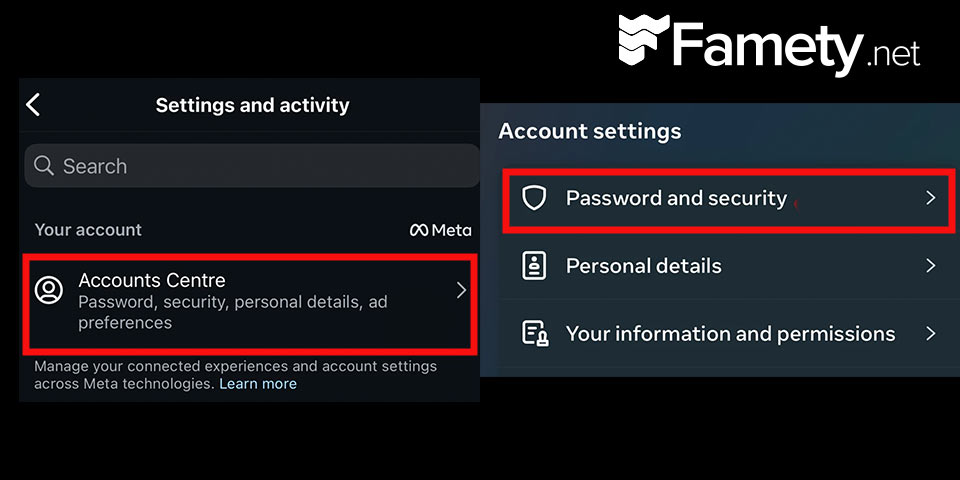
- Go to Instagram > Settings > Security > Password
- Enter your current and new passwords
- Tap Save
Make sure you choose a strong and unique password!
Check for Connected Devices
Remove unknown or old devices from your login history.
- Go to Instagram > Settings > Security > Login Activity
- Tap on any unfamiliar locations and tap Log Out
This will log your account out of those sessions and protect it from repeated logouts.
Revoke Access to Third-Party Apps
Do you remember linking any weird app to your Instagram? Time to cut them off.
- Visit Instagram’s authorized apps page
- Revoke access to anything that looks suspicious
This can solve your logout issues almost instantly if bots or unauthorized apps are involved.
Tips to Keep Your Instagram Session Stable
Even after fixing the issue, these tips will help ensure you stay logged in.
- Avoid frequent logins on too many devices
- Don’t share your password with others
- Enable two-factor authentication (2FA)
- Use only the official Instagram app
- Turn off VPNs or location-masking tools when logging in
What If Nothing Works?
Still getting logged out? Try the following.
- Uninstall and reinstall the app from scratch
- Log in using a web browser to check if the issue is app-related
- Contact Instagram Support using the in-app Help Center or Meta’s official support page
Final Thoughts
If Instagram keeps logging you out, it’s not always your fault and it’s usually fixable. Whether it’s a bug, a login conflict, or a security concern, this issue can be resolved by following the steps in this guide. Keep your app updated, protect your account, and avoid third-party tools that violate Instagram’s policies. No one likes to be unexpectedly kicked out of their social world so take back control and stay connected.