- The Discover People feature suggests accounts using contacts, mutual connections, and Facebook data.
- Some users find these suggestions intrusive and prefer more privacy.
- You can reduce suggestions by turning off contact syncing and deleting uploaded contacts.
- Unlinking Facebook limits cross-platform recommendations and data sharing.
- Disabling Similar Account Suggestions on desktop prevents your profile from being recommended to others.
- Go to your Instagram profile.
- Tap the three-line menu in the top-right corner.
- Select Settings and Privacy.
- Tap Accounts Center.
- Choose Connected Experiences.
- Turn off Contacts Syncing.
- If Facebook is connected, unlink your Facebook account.
What Is the ‘Discover People’ Feature on Instagram?
The “Discover People” feature on Instagram helps you find accounts to follow based on mutual friends, contact syncing, and connected platforms like Facebook. It’s designed to make networking easier by suggesting relevant users. While helpful for some, it may feel invasive or cluttered for others, especially if you prefer a more private or curated Instagram experience without external suggestions or connections.
Why You Might Want to Turn Off Discover People
Many users disable Discover People to keep their feed more intentional, cut down on unwanted suggestions, and protect their privacy. When Instagram starts recommending coworkers, old contacts, or random acquaintances, the experience can feel uncomfortable and distracting. Turning this feature off helps create a calmer, more focused browsing space where you only see content you actually care about. In the same way, being selective about how your profile grows matters too, and some people prefer controlled solutions like famety insta followers to build their presence without relying on aggressive recommendations or constant exposure.
How to Disable Contact Syncing to Reduce Suggestions
Disabling contact syncing stops Instagram from accessing your phone contacts to suggest people. Here’s how:
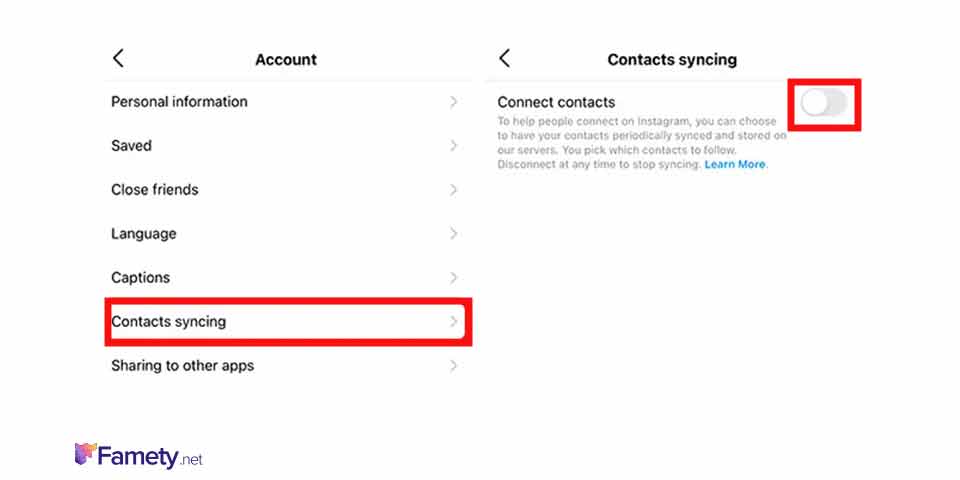
- Open Instagram and go to your profile.
- Tap the three-line menu in the top right.
- Go to Settings and Privacy.
- Tap Accounts Center.
- Choose Your Information and Permissions.
- Select Upload Contacts.
- Turn off the sync toggle.
- Tap Manage contacts and delete previously uploaded contacts, if applicable.
This helps significantly reduce contact-based suggestions.
How to Unlink Facebook to Limit Suggested Accounts



Instagram suggests users based on your Facebook data if accounts are linked. To unlink them:
- Go to your Instagram profile.
- Tap the menu, then Settings and Privacy.
- Select Accounts Center.
- Tap Accounts.
- Choose your Facebook account.
- Select Remove from Accounts Center.
Unlinking prevents cross-platform data use and keeps your social networks separate.
How to Stop Instagram from Suggesting Your Account to Others
To stop your account from being recommended in “Suggested for You”:
- Use a desktop browser and log in to Instagram.
- Go to your profile, then click Edit Profile.
- Scroll to “Similar Account Suggestions”.
- Uncheck the box to disable your profile from being shown in other users’ suggestions.
- Optionally, switch to a private account under Settings for more privacy control.
This limits your exposure in automated recommendations.