- Half-swiping on Instagram lets users preview messages or stories without triggering Seen or Viewed alerts.
- The method works by partially swiping a DM or dragging into a story without fully opening it.
- It is not an official Instagram feature but is widely used for privacy.
- The trick may stop working after app updates or if not done carefully.
- Alternative privacy options include airplane mode, notification previews, or using a secondary account.
- Open your Instagram inbox and locate the message you want to preview.
- Gently swipe right on the message without fully opening it.
- Stop halfway and hold your finger there to peek at the content discreetly.
- For stories, start on the previous story, press and drag slightly toward the next story without releasing your finger.
- This method lets you preview content without triggering a “Seen” or “Viewed” notification, helping you stay private.
What Does Half-Swipe Mean on Instagram?
Half-swiping on Instagram means partially viewing a message or story without fully opening it. This trick is used to prevent the “Seen” or “Viewed” status from being triggered. By stopping the swipe midway, you can preview content while maintaining your privacy. It’s a useful hack for checking DMs or stories without alerting the sender that you’ve looked at them.
Can You Really Half-Swipe on Instagram?
Yes, you can half-swipe on Instagram by carefully dragging a message or story without fully opening it. This method helps you preview content without triggering read receipts. While not an official feature, many users successfully use it to stay discreet. It requires precision and may take a few tries, but it can work well when done correctly.
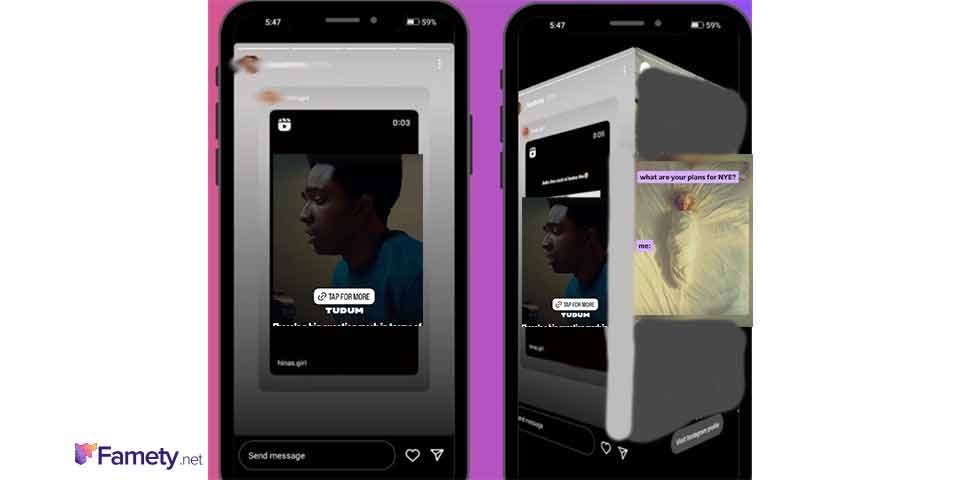
How to Half-Swipe on Instagram Direct Messages
- Open the Instagram app and go to your DM inbox.
- Press gently on the message you want to preview.
- Slowly swipe it to the right without letting go.
- Hold your finger in place once you can see part of the message.
- Do not release or swipe too far, or it will fully open and mark as “Seen”.
- Practice the motion to get comfortable with the right amount of swipe.
Does Half-Swiping Let You Read Messages Without ‘Seen’?
Yes, if done correctly, half swiping lets you preview messages without showing the “Seen” tag. It works by viewing the message through the swipe preview pane rather than opening it fully. Still, this method is not always foolproof, especially if you swipe a bit too far and the message opens completely. For people who care about privacy and staying in control of their interactions, it can be a useful habit to learn. The same idea of being intentional applies to managing your social presence too, which is why some users choose tools like famety instagram followers to grow their accounts more smoothly without constantly micromanaging every detail.
How to Half-Swipe on Stories Without Fully Opening Them
To half-swipe a story, start by watching the story just before the one you’re curious about. Then, press and drag slightly toward the next story, keeping your finger in place. Don’t release. You’ll see a preview of the upcoming story without officially opening it. This lets you view discreetly without sending a “Seen” notification to the creator.
Limitations of the Half-Swipe Trick on Instagram



While helpful, the half-swipe trick isn’t perfect. If you release your finger or swipe too far, the message or story opens fully, revealing that you’ve seen it. The technique may also vary between iOS and Android and can stop working after updates. Additionally, it doesn’t always work with video messages or when Instagram changes its UI behavior.
Does Instagram Notify When You Half-Swipe a DM or Story?
No, Instagram doesn’t send notifications when you half-swipe a DM or story. That’s the core benefit of the trick it keeps your actions private. However, if you swipe too far or accidentally release your finger, the content fully opens and a “Seen” or “Viewed” notification will be sent. Precision is key to staying invisible.
Can This Still Work After App Updates?
Sometimes, yes. But Instagram updates can change how swiping works, making the half-swipe trick unreliable. If you notice the trick behaving differently, it’s likely due to recent app changes. Testing it after each update helps you know if it’s still functional. Since this isn’t an official feature, there’s no guarantee it’ll always work consistently.
Tips to Stay Private When Viewing Messages or Stories
- Use Airplane Mode to view messages offline, then force-close the app.
- Stick to half-swiping and practice the motion carefully.
- Disable read receipts in other platforms, but note Instagram lacks this option.
- Use alternative accounts for viewing if privacy is critical.
- Watch from browser versions where possible; they behave differently.
These approaches help you stay discreet without risking a “Seen” alert.