If you have spent any time on Discord, you have almost certainly seen the yellow moon icon next to someone’s username indicating that they are Idle. It sits alongside three other status indicators (Online, Do Not Disturb, and Invisible) and communicates something specific: the user is signed in but has been inactive for a while, or has manually chosen to appear that way.
This guide explains exactly what Idle status means on Discord in 2026, how it differs from Online and Away modes, when Discord automatically sets you to Idle, how to manually change your status, and why it matters for both regular users and community owners. Because Discord is fundamentally about presence, understanding what these status indicators say to other members shapes how people interact with your account and your servers.
What Does Idle Mean on Discord?
Idle on Discord means one of two things:
- You have Discord open (in the app or on the web) but have not interacted with it for a set period of time. Discord automatically sets you to Idle after several minutes of inactivity.
- You have manually set your status to Idle to signal to others that you are not actively engaged, even if you happen to be at your keyboard.
Either way, the visible effect is the same: your username appears with a yellow moon icon next to it in server member lists, direct messages, and voice channels. Other users see this and understand that pinging or messaging you might not get an immediate response.
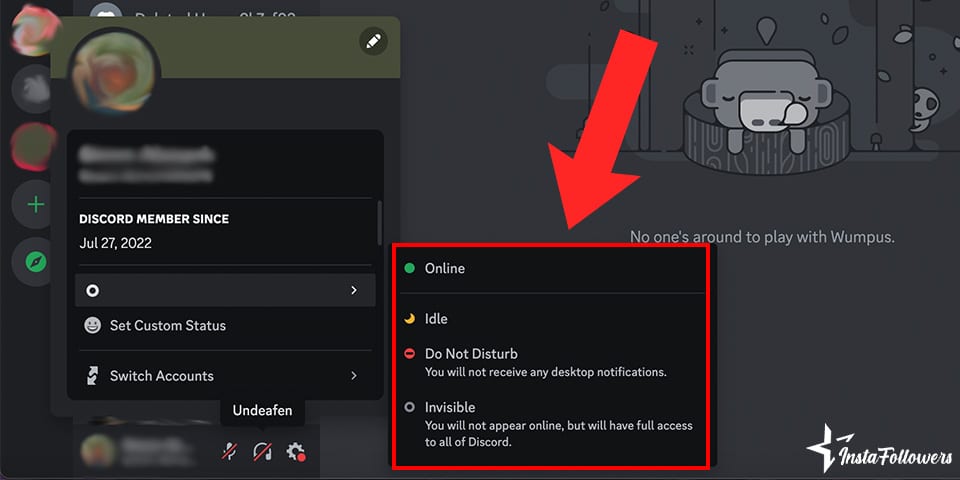
The 4 Discord Status Options at a Glance
| Status | Icon | What It Signals |
|---|---|---|
| Online | Green circle | Actively signed in and available. |
| Idle | Yellow moon | Signed in but inactive or away for a while. |
| Do Not Disturb (DND) | Red circle with a line | Signed in but muting all notifications. |
| Invisible | Grey circle | Signed in but appearing offline to everyone else. |
When Does Discord Automatically Set You to Idle?



Discord’s automatic Idle trigger kicks in after roughly 5 to 10 minutes of no keyboard, mouse, or touchscreen activity on the device Discord is running on. The exact threshold varies slightly by device and version, but the behaviour is consistent:
- Desktop app: Idle triggers after several minutes without input.
- Browser (web app): Idle triggers when the Discord tab is not the active window for several minutes.
- Mobile app: Idle behaviour is different because mobile apps are usually backgrounded rather than actively used. Discord typically shows you as Online while the app is running in the background.
The moment you type, click, or interact with the Discord window again, your status flips back to Online automatically.
How to Manually Set Your Status to Idle
You can manually set yourself to Idle at any time, regardless of whether you are actively using Discord. This is useful when you want to signal that you are around but not actively watching for messages.
On Desktop
- Open Discord.
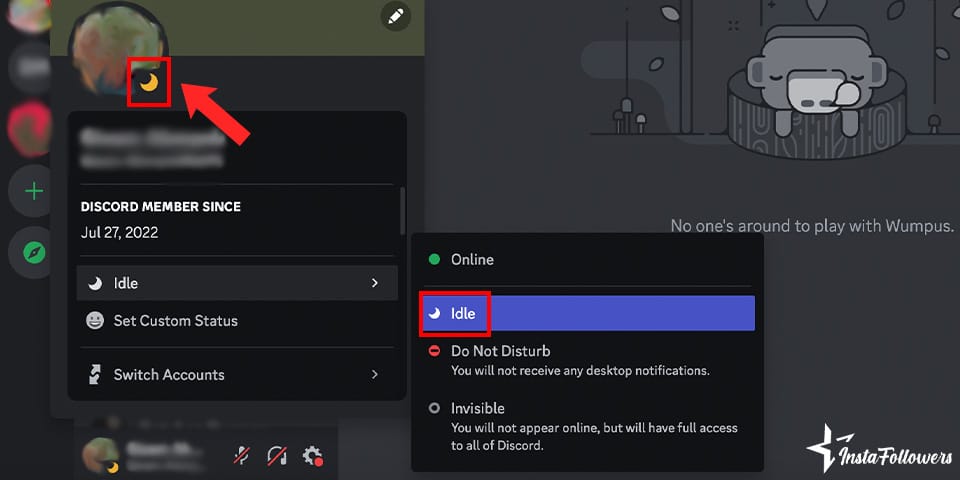
- Click your profile picture in the bottom left corner of the app.
- Click your current status (Online, for example).
- Select Idle from the dropdown.
Your icon updates immediately, and everyone in your servers sees the yellow moon next to your name.
On Mobile
- Open the Discord app.
- Tap your profile picture in the bottom right corner.
- Tap Set Status.
- Select Idle.
Idle vs Do Not Disturb: What Is the Difference?
Both Idle and Do Not Disturb tell others that you are unavailable, but they differ in what they actually do:
- Idle changes your visible status but does not affect your notifications. You will still receive DMs, mentions, and message alerts normally.
- Do Not Disturb changes your status and mutes all notifications, including mentions and direct messages, until you change your status back.
If you want to actually block the ping without appearing hostile (“I am here but do not disturb me”), DND is the correct choice. If you want to signal “I might not respond immediately but ping me if it is important,” Idle is the right one.
Idle vs Invisible: What Is the Difference?
Invisible mode shows you as offline to everyone else, even though you are actually signed in. Idle keeps you visible but marked as inactive.
- Use Idle when you want people to know you are around but not actively engaged.
- Use Invisible when you want to browse Discord without anyone knowing you are online.
Invisible is popular with users who want to lurk in servers without being pinged. Community owners generally recommend against using Invisible in servers where you play an active role, because it can send the wrong message to other members who see you as offline when you are actually reading everything.
Can Others See When You Went Idle?
No. Discord shows only that a user is currently Idle, not when they went Idle or how long they have been inactive. There is no timestamp attached to the status. This is a deliberate design choice: Discord does not want to expose fine-grained presence data that could feel intrusive.
Does Idle Affect Voice Channels or Streaming?
No. Idle is only a text-based status indicator. If you are in a voice channel or streaming, other members can see you are in the channel regardless of your text status. Being marked as Idle does not disconnect you from voice, video, or a live stream. Discord treats voice activity as a separate signal from text presence.
Common Reasons Users Set Themselves to Idle
- Managing expectations in a large server: signalling that you might not respond quickly.
- Multitasking: working on something else while Discord is open in the background.
- Reducing pings: friends and colleagues are less likely to ping someone marked as Idle.
- Presence hiding without going Invisible: staying visible for context but not appearing available.
- Signalling availability changes throughout the day: many active Discord users cycle between Online, Idle, and DND based on their focus level.
How Server Owners Use Status Awareness to Build Community
For Discord community owners, understanding member status patterns is more useful than most people realise. Members who spend a lot of time as Idle are still checking in on the server; they are just not always active. Servers that maintain high member counts often have a large Idle contingent that occasionally spikes into Online during events, conversations, or big announcements.
Community owners can use this insight in several ways:
- Schedule events at times when Online counts historically spike (weekend evenings for most gaming and social servers).
- Send @everyone announcements sparingly to avoid burning out Idle members who receive every ping.
- Design channels for asynchronous engagement (long-form discussion, image sharing) that reward Idle members who check in later rather than expecting live participation.
- Use bot-generated reminders or role-tagged pings to reach specific active groups rather than everyone at once.
How to Grow Your Discord Server Through Social Media
Growing a Discord server past the initial friend group requires audience acquisition from outside Discord. The platform’s internal discovery is limited, so most successful servers grow through external channels. The methods that consistently work in 2026:
TikTok Clips That Show Server Culture
Short clips (30 to 60 seconds) that showcase moments from your server, community reactions, or events give TikTok viewers a reason to check the invite link in your bio. Gaming, art, and creative servers grow especially fast this way because the content is visual and immediately shareable.
Instagram Cross-Posting
An Instagram profile with a Discord invite link in the bio, occasional posts about server activity, and Stories that announce inside-jokes or upcoming events keeps your existing audience engaged and gives them reasons to invite friends.
Discord Server Directories
Listing your server on Disboard, Discord.me, and Discadia brings a steady trickle of new members from users who are actively browsing for new communities. Consistent bumping (Disboard bumps are every 2 hours), good tags, and engaging descriptions improve directory ranking.
Collaboration with Other Servers
Partnering with server owners in adjacent niches for cross-promotion exposes both communities to each other. Joint events, shared giveaways, or mutual announcements can bring in hundreds of new members in a short window.
Grow Your Discord Server with Social Media
The size and quality of your social media following directly influences how quickly a Discord server can grow. Creators and community owners with larger Instagram and TikTok audiences launch and scale Discord servers faster because more people see the invite, click it, and stay long enough to become active members.
Famety helps community builders grow their Instagram followers and TikTok followers to build the off-platform audience that fills a Discord server with real members. More followers on social means more people seeing your server announcements, more clicks on your invite links, and a starting membership base that turns discovery into a self-sustaining growth loop.
Frequently Asked Questions About Discord Idle Status
What does Idle mean on Discord?
Idle means you are signed in to Discord but inactive or away. It appears as a yellow moon icon next to your username. Discord sets it automatically after several minutes without keyboard or mouse activity, or you can set it manually. Other users see the status and understand you may not respond immediately.
How long until Discord marks you as Idle?

Creating polls in Discord is one of the best ways to engage your community and gather feedback quickly. Whether you’re asking about game nights, team ...

Discord has become one of the largest community platforms on the internet, with over 19 million active servers at any given time and hundreds of milli...
Discord automatically sets you to Idle after roughly 5 to 10 minutes of no input activity on the device where Discord is running. The moment you interact with the app again (typing, clicking, or touching the screen), your status flips back to Online.
What is the difference between Idle and Do Not Disturb on Discord?
Idle is a passive indicator that you are away or inactive but still receive normal notifications. Do Not Disturb (DND) actively mutes all notifications, including direct messages and mentions, until you change your status.
Can others see when I went Idle?
No. Discord shows only that a user is currently Idle, not when the status changed or how long it has been active. There is no timestamp attached to the status indicator.
Does being Idle affect voice channels or streaming?
No. Idle is a text-based status only. Being in a voice channel, video chat, or stream is a separate presence indicator. Idle does not disconnect you from voice or video and does not affect what other members can see about your voice activity.
How do I manually change my Discord status to Idle?
Click your profile picture (bottom left on desktop, bottom right on mobile), tap your current status, and select Idle from the dropdown or menu. Your icon updates immediately.
Should I use Idle or Invisible on Discord?
Use Idle when you want people to know you are around but not actively engaged. Use Invisible when you want to browse Discord without appearing online at all. Idle is more social; Invisible is more private.