Viewing Instagram without an account is possible if you rely on third party tools that load public content for you in a browser, but it always comes with limits and privacy trade offs that you should understand before you start clicking around. Viewing Instagram in this way is a read only experience that lets you look at public profiles, posts and sometimes stories, while taking away every form of interaction such as likes, comments or direct messages.
What It Really Means To View Instagram Without Logging In
Viewing Instagram without an account is a way of accessing only the public layer of the platform through your browser, without signing into the official app or website. Viewing Instagram without logging in does not give you the same features as a normal user account and it does not bypass Instagram’s privacy settings for private profiles.
Viewing Instagram without an account always relies on at least one of these mechanisms:
- Use of external websites that query Instagram’s public content on your behalf and show you the results
- Use of search engines to find public profile URLs, post URLs or hashtag pages that are indexed
- Use of special tools that focus on one content type such as stories, reels or profile photos and wrap Instagram’s public endpoints in a simpler interface
These mechanisms have one thing in common, they only work with content that Instagram itself exposes publicly.
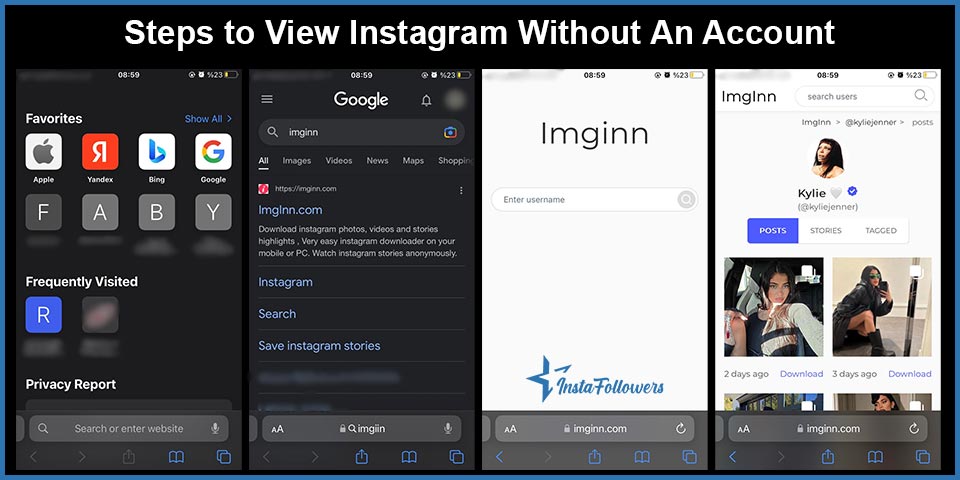
Steps to View Instagram Without An Account



Third party Instagram viewer websites are tools that load public profiles, posts and sometimes stories in your browser without asking you to sign in. Third party Instagram viewers are convenient, but they sit between you and Instagram, so you must treat them as untrusted sites and protect your privacy while using them.
Here is a simple, safer way to view Instagram without an account:
- Open any modern browser
Your preferred browser on desktop or mobile, such as Chrome, Safari, Firefox or Edge, is enough. The method is browser independent, because the viewer websites work through normal web pages. - Search for a reputable Instagram viewer site
A search for phrases like “Instagram viewer for public profiles” or “view Instagram without account” usually shows multiple services. Good signs are that the site clearly states it:- Only shows public contentDoes not ask for your Instagram passwordDoes not require registration to start browsing
- Use the search bar on the viewer site
The Instagram viewer’s search bar is where you type the exact username or paste the profile URL you want to see. Many viewers also allow you to search by link, which reduces the chance of opening the wrong profile. - Open the public profile and browse posts
Public profiles on these tools usually show the feed grid, captions and sometimes story highlights. If the account is public, you will often see posts, reels and basic profile information. If the account is private, a trustworthy viewer will simply show you that the content is not available and will not pretend to unlock it. - Avoid logging in through the viewer
Login forms on viewer sites are a major red flag. A secure viewer does not need your credentials to show public posts and any login form on such a site can be a phishing attempt against your Instagram account. - Use a dedicated tool if you only need a profile picture
Profile picture enlarger tools are useful if all you want is a bigger, clearer version of a public profile photo. These tools typically take the public avatar image and render it at a higher resolution without touching the rest of the profile.
This workflow uses the browser you already have, avoids installing extra apps and keeps your Instagram password strictly inside the official app or site.
What You Can Actually Do Without An Instagram Account
Instagram without an account lets you consume a limited set of content from public profiles, but it does not give you participation features or full analytics. Instagram without logging in is closer to reading a public web page than joining a social network.
Instagram content that you can access anonymously usually includes:
- Viewing public profiles completely
Public accounts typically show their bio, profile photo, follower counts and followings. You can read these details and see how the user presents themselves. - Viewing public photos, reels and videos
Public posts on a grid are normally available through viewer tools, so you can open photos, videos and carousels, including captions and visible comments. - Viewing some stories and highlights from public accounts
Story viewer tools often fetch public stories and highlight covers for you, so you can watch them without logging in. Support for highlights varies from service to service. - Downloading public posts and media
Download buttons on many sites simply save the media files your browser is already loading. You can download photos and videos from public posts or public stories if the viewer supports it. - Viewing profile pictures at full resolution
Profile picture tools can enlarge avatars from public accounts that look tiny inside the official app.
What you can do is always limited to what Instagram treats as public and what the third party service can technically access and display.
Limitations And Downsides Of Using Third Party Viewers
Third party Instagram viewers are convenient tools for quick, anonymous browsing, but they always come with limitations and risk factors that you must treat seriously. Third party Instagram viewers are never perfect mirrors of the official app and they are never fully risk free.
Main functional limitations include:
- No likes, comments or follows
Interaction requires a logged in identity, so you cannot like posts, leave comments, send messages or follow accounts through a viewer site. - No personalized feed or explore page
Personalized recommendations depend on your account’s history and connections, so you will not see a customized home feed or Explore page through an anonymous viewer. - No access to private content
Private account content remains visible only to approved followers on Instagram. You cannot see posts, stories, highlights or reels from private accounts unless you are logged into a real Instagram account that the owner has accepted. - Possible delays or missing content
Viewer tools sometimes refresh content slowly or do not support all formats, so newly posted reels, stories or highlights may not appear immediately, or may not appear at all.
Important downsides and risks include:
- Privacy risk on the viewer side
Viewer sites can log your IP address, device details and every profile or post you open. Your behavior may be invisible to the profile owner, but it is not invisible to the service you are using. - Security risk from malicious sites
Unknown “Instagram viewer” apps or browser extensions can contain malware or behave as phishing tools. Any site that asks for your Instagram username and password should be treated with suspicion. - Legal and terms of service concerns
Automated scraping, mass downloading or republishing of Instagram content can violate Instagram’s policies or copyright law. You should not reuse other people’s media without permission, even if a viewer makes downloading easy.
Using third party viewers works best for occasional, low stakes viewing of public content and it does not replace the stable, supported experience of using Instagram with your own account.
Can You See Private Instagram Accounts Without An Account?
Private Instagram accounts are designed to restrict access to approved followers and this design means that you cannot see private posts or stories without logging into a real account that the owner has accepted. Private Instagram accounts keep their posts, reels and stories hidden from strangers and from anonymous viewers.
Private account visibility relies on these principles:
- Instagram’s privacy model is explicit
Private accounts treat their content as closed, and only followers who have been approved can see posts and stories. Legitimate third party viewers do not bypass this model and will simply show that content is unavailable. - “Private account unlocker” apps are red flags
Tools that promise to show full private feeds, private stories or private messages without consent almost always mislead users or attempt to steal data. These services should be avoided completely. - Respect for privacy is essential
Respecting private status is part of responsible social media use. If someone chooses to keep their content private, the ethical choice is to accept that boundary instead of trying to circumvent it.
In practical terms, you cannot legitimately view the posts of a private Instagram account without a logged in, approved account, regardless of what any marketing copy claims.
Frequently Asked Questions About Viewing Instagram Without An Account
These common questions about viewing Instagram without an account show where anonymous viewing is possible and where Instagram’s own systems still control what others can see.
Can someone see that I viewed their story using these tools?
Instagram story views from logged in users are normally recorded and shown to the story owner, but anonymous story viewers for public accounts do not attach your real account identity to that view. Many story viewer tools are built to fetch public stories and allow you to watch them without your name appearing in the viewer list.
Story viewing in this way still has limits:
- Instagram still receives a technical request for the story from the viewer service
- The viewer website can log that you accessed that story
- Your anonymity applies only to the story owner, not necessarily to every system in the chain
It is more accurate to think of anonymous story viewing as reduced visibility to other users rather than complete invisibility.
Can anyone tell that I viewed their Instagram profile?
Instagram profile visits are not shown to profile owners as a built in feature, so there is no official way for someone to see that you simply opened their profile. Instagram highlights interactions such as likes, comments, follows and story reactions, not silent profile views.
Third party “who viewed my profile” apps do not have access to Instagram’s internal logs and cannot reliably report visitors. Many of them exist to collect data or drive ads rather than to offer accurate analytics.
If you only view public content without interacting, the other person will not see a notification for your profile visit inside Instagram.
Can you see who screenshots your story?
Instagram screenshot behavior causes a lot of confusion, but the rule is simple. Instagram does not notify users when someone takes a screenshot or screen recording of their stories, posts, reels or profile pages.
A TikTok video sits at 0 views for one of six reasons: it is still in TikTok's automated review (usually clears in 5 to 30 minutes), the video was fla...
Instagram usually blocks a new account for one of six reasons: you already have 5 accounts linked to the same email or phone number, you have 5 accoun...
There is one important exception in private messaging:
- Disappearing photos or videos sent in a direct message can trigger a small icon that indicates a screenshot to the sender
Standard stories, normal posts and regular DMs do not send any screenshot alerts.
Can anyone find out that I “stalked” them by viewing their content a lot?
Instagram does not publish a list of people who repeatedly visit a profile, so there is no direct “stalkers list”. What people can see is activity that leaves visible traces, such as:
- Repeated likes on many old and new posts
- Frequent comments on different photos or reels
- Continuous replies or reactions to stories
- Multiple follow and unfollow actions in a short period
If you only view public content through an Instagram viewer without an account and never interact, the other person cannot see that viewing activity inside Instagram. The viewer service can still log your behavior, so you remain visible to the tool you use.
Can I use the Instagram app itself without signing in?
Instagram’s official mobile apps and its official website both require a login for normal use, so you cannot use the native Instagram experience without signing into an account. Past options to view more content while logged out have been reduced over time and Instagram now clearly encourages users to register.
If you want to interact, follow accounts, save posts or publish your own content, the only stable solution is to create a free account and use Instagram directly.
Are Your Views Without An Instagram Account Private?
Instagram views made without an account are more private from the perspective of other users, but they are never completely invisible to Instagram, to the Instagram viewer service you use or to your internet provider. Instagram viewer tools sit in the middle of every request and have full visibility into which usernames you search and which posts, stories or profile photos you open.
Anonymous viewing through such services generally creates this privacy pattern:
- The profile owner cannot see your name in their followers list or story viewers list
- Your own Instagram account, if you have one, is not involved in the request
- The viewer service can log every profile, post and story you access
- Instagram’s systems still see that the viewer’s servers requested certain public content
For everyday use, browsing through a viewer is more discreet than visiting profiles with your logged in account, but it is not absolute anonymity. The safest and most sustainable approach is to combine anonymous viewing with respectful behavior, stay within public content, avoid re uploading other people’s media without permission and consider creating a normal account if you want to interact openly and transparently.