Instagram polls are one of the simplest interactive tools on the platform, yet they remain incredibly effective for sparking engagement, gathering opinions, and making your audience feel involved. Whether you’re a creator, a brand, or someone who just enjoys posting Stories, polls give your content a dynamic, participatory feel.
With only a few taps, you can ask a question and offer two response options. This quick interaction can increase Story views, boost time spent on your content, and deliver instant insight into what your audience prefers.
In this guide, you’ll learn where polls appear on Instagram, how they function, how to create them, and the smartest ways to use them.
What Is an Instagram Poll?
An Instagram poll is an interactive sticker that lets people vote on a question you ask. You’ll find it most commonly in Stories, though Instagram has extended poll functionality to group chats and, in certain regions, to Reels or select feed formats.
Polls offer an easy, real-time way to learn what your audience thinks and encourage meaningful participation.
Where Instagram Polls Appear (Stories, Chats, Reels)
Instagram supports polls in several areas across the app:
Stories
The most widely used placement, where you can add a “Poll” or “Emoji Slider” sticker on top of any story.
Group Chats
DM groups allow all participants to vote directly inside the conversation.
Reels (limited availability)
Some users can add poll stickers to short-form videos to collect quick reactions.
DMs & Broadcast Channels
Polls help you interact with larger audiences or tight-knit communities in private discussions.
Polls vs. Quizzes vs. Emoji Sliders
Instagram offers three interactive sticker types, each suited to a different purpose:
| Feature | Purpose | Interaction Type |
|---|---|---|
| Poll Sticker | Collect two-option responses | Simple tap selection |
| Quiz Sticker | Ask multiple-choice questions | Choose 1 of up to 4 answers |
| Emoji Slider | Measure sentiment or intensity | Drag to set a value |
Polls work best when you want fast, clear feedback. Quizzes help test knowledge, while emoji sliders capture nuance.
How to Create an Instagram Poll (Step-by-Step)
Polls are easy to add to Stories, chats, and if available Reels or posts. Here’s how to set them up.
How to Add a Poll in Instagram Stories
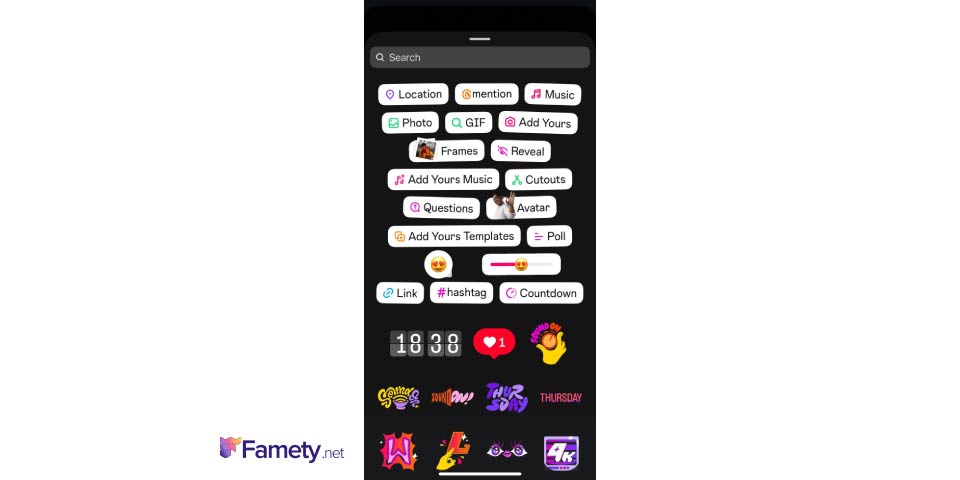
- Open Instagram and swipe right to access the Stories camera.
- Upload or capture a photo/video.
- Tap the sticker icon at the top of the screen.
- Select the Poll sticker.
- Type your question and customize the “Yes/No” options if needed.
- Position the poll anywhere on your Story.
- Tap Share to Your Story.
Your followers can vote immediately after your Story goes live.
Creating a Poll in Reels or Posts (If Available)
Polls inside Reels or feed posts are part of Instagram’s evolving features. If your account has access:
- Open the Reel or Post creator.
- Add your media.
- Tap the sticker or interaction button.
- Choose Poll and set your question and options.
- Place the sticker where you want it to appear.
- Publish the content.
Availability varies by user, country, and app version.
How to Create a Poll in Group Chats
Polls in group DMs are great for decision-making or gathering quick feedback.
- Open a group conversation in Direct Messages.
- Tap the + button or sticker icon.
- Select Poll.
- Write your question and add answer options.
- Tap Create Poll.
Everyone in the chat will see the poll and can vote instantly.
Customizing Poll Options and Design
Polls are simple by nature, but you can make them more eye-catching by:
- Using bold colors or filters behind the poll
- Placing the sticker where it doesn’t block key visuals
- Replacing text options with creative labels or emojis
Good design helps ensure people notice and interact with your poll.



How to Delete or Edit an Active Poll
Instagram does not allow edits to a poll after it’s published.
However, you can:
- Delete a poll in Stories: Open your Story → tap three dots → Delete.
- Repost with changes: Delete the original, recreate the poll, and publish again.
How to View and Share Poll Results
Once your poll is live, Instagram provides real-time insights so you can monitor engagement and share the outcome.
Viewing Poll Insights in Stories
To check how people voted:
- Open Instagram and tap Your Story.
- Navigate to the Story containing your poll.
- Swipe up or tap the activity icon.
You’ll see:
- Total votes
- Who voted
- Which option each person chose
Poll Time Limits
Polls stay active for the lifespan of your Story typically 24 hours.
After that:
- No new votes can be submitted.
- Final results remain viewable in your Story Archive if enabled.
- Followers can no longer access the poll itself.
To preserve results, save the Story to a Highlight or screenshot the insights.
Sharing Poll Results
To show your audience what won:
- Reopen the poll Story.
- Swipe up to see results.
- Tap Share Results.
Instagram automatically generates a summary slide, which you can customize before publishing.
Instagram Poll Ideas to Boost Engagement
These formats help you drive conversation, entertain followers, or gather valuable insights.
“This or That” Questions
Great for fast, visual engagement:
- Coffee or tea?
- Early bird or night owl?
- City break or nature escape?
Ideal for lifestyle, fashion, and entertainment accounts.
Would You Rather…?
These spark more conversation:
- Travel the world for free or eat at any restaurant for free?
- Lose your phone or your wallet?
This format encourages DMs and comment debates.
Product Feedback & Market Research
Perfect for businesses and creators:
- Which color should we release?
- Launch in summer or fall?
- What price range feels right?
Polls double as quick validation tools.
Quizzes & Guessing Games
Turn your Story into something playful:
- Guess the ingredient: 🥑🍅🧅
- Which country has this flag? 🇳🇴
- How well do you know our brand?
Followers often return to see the correct answer.
Content & Event Promotion
Use polls to shape your upcoming content:
- What should tomorrow’s reel cover?
- Should we go live at 6 PM or 8 PM?
- Which topic should we explore next?
This creates involvement and increases anticipation.
Poll Format Ideas by Purpose
| Poll Type | Best Use | Example |
|---|---|---|
| This or That | Quick preferences | “Morning or night?” |
| Would You Rather | Fun engagement | “Beach vacation or mountain retreat?” |
| Product Feedback | Business decisions | “Which color do you prefer?” |
| Quizzes & Games | Learning or entertainment | “Which logo came first?” |
| Event Promotion | Community involvement | “Q&A or tutorial next?” |
Pro Tips for More Effective Instagram Polls
These strategies help maximize engagement and make your polls more appealing.
Keep Your Poll Short and Visually Clean
Use:
- Clear, bold text
- High-contrast backgrounds
- Short A/B choices
Avoid clutter or lengthy questions.
Ask Questions People Relate To
Consider what would make someone stop and vote:
- Everyday habits
- Trending discussions
- Lighthearted personal questions
Relevance drives participation.
Enhance Polls with Stickers or GIFs
Try adding:
- Reaction GIFs
- Emojis
- Countdown stickers for upcoming events
These elements draw attention and add personality.
Post Polls During High-Activity Windows
Polls perform best when:
- Published around midday or early evening
- Timed based on your audience’s Insights data
- Paired with other Stories for context
Experiment to find your ideal posting schedule.
Do Polls Help Increase Followers?
Yes polls can help increase Instagram followers, but not in a direct or automatic way. Polls work by boosting engagement, and higher engagement often leads to greater visibility. When more people interact with your Stories, Instagram’s algorithm is more likely to push your content to the front of their feed or even show it to new audiences through Explore and recommendations. This increased reach gives you more opportunities to attract new followers.
A TikTok video sits at 0 views for one of six reasons: it is still in TikTok's automated review (usually clears in 5 to 30 minutes), the video was fla...
Instagram usually blocks a new account for one of six reasons: you already have 5 accounts linked to the same email or phone number, you have 5 accoun...
Polls also make your account feel more interactive and personable. When viewers feel involved in your content, they’re more likely to return, share, and eventually follow. Asking meaningful, entertaining, or relatable questions builds a stronger connection with your audience and that connection is what ultimately encourages users to hit the follow button.