If you have ever accidentally archived an Instagram story or simply want to revive an old moment, you can easily bring it back from your Story Archive. In a few taps, you can find your old stories, download them, reshare them or turn them into Highlights so they live on your profile again.
Instagram Story Archive features give you a private library of everything you have shared, so you never lose a story once it disappears from the public 24 hour window.
What Is the Instagram Story Archive and How Does It Work?
The Instagram Story Archive is a built in feature that automatically saves your stories after they expire from your public profile. When the 24 hour visibility period ends, your stories move into this private archive, where only you can see them. The archive lets you revisit, reshare or download old stories without having to save every single one manually to your device.
Where Is the Instagram Story Archive Located?
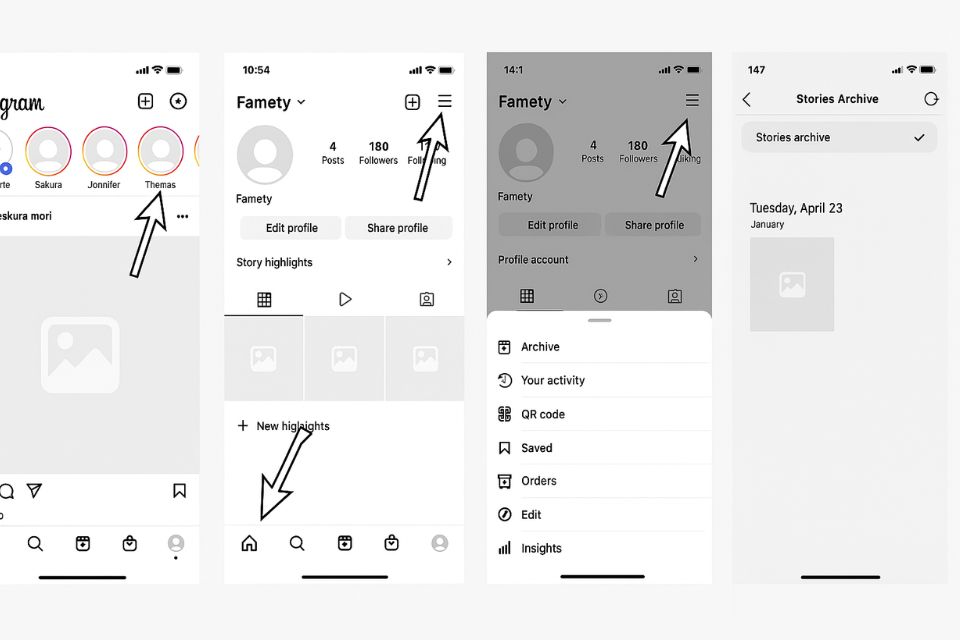
The Instagram Story Archive sits inside the Archive section of your profile menu. To find it:
- Open the Instagram app.
- Go to your profile by tapping your profile picture in the bottom right.
- Tap the menu icon (≡) in the top right corner.
- Select Archive.
- At the top, make sure it says Stories Archive. If it shows Posts or Lives instead, tap the dropdown and choose Stories Archive.



Once you switch to Stories Archive, you see a chronological grid or list of every story Instagram has saved from your account.
How Long Are Instagram Stories Stored in the Archive?
Instagram Stories in your archive are stored indefinitely unless you decide to delete them. The archive does not have an automatic expiration date, so you can scroll back months or even years to find old content. You can remove any story from the archive manually, but if you do not, it stays there as a private history of your activity.
Can Archived Stories Be Downloaded?
Archived stories on Instagram can be downloaded to your phone if you want a copy outside the app. To do this, open the story from your archive, tap the three dot menu in the bottom right, then choose Download or Save photo/video.
Downloaded stories can then be edited, reposted, shared on other platforms or simply kept in your device gallery as a memory.
Why Can’t I See My Archived Stories on Instagram?
Archived stories on Instagram sometimes seem to disappear for reasons that are usually easy to fix. In many cases, the archive is still there, but the app is showing you a different archive type, your settings are turned off or the app is not loading correctly.
Common Visibility Issues and Fixes
Common visibility issues in the archive usually come down to filters, preferences or technical problems. By checking a few key settings and ensuring your app and connection are working, you can often bring your archived stories back into view in seconds.
The Archive View Is Set to Posts or Lives
The Archive view may be set to Posts Archive or Live Archive instead of Stories Archive. At the top of the Archive screen, tap the dropdown and make sure Stories Archive is selected, because otherwise you are only seeing archived posts or live videos, not your stories.
Your Archive Setting Is Turned Off
Your archive setting for stories might be turned off in your privacy controls. If this option is disabled, Instagram does not save new stories at all, so nothing will appear in the archive while it is off and stories from that period cannot be recovered.
App Glitch or Outdated Version
App glitches or outdated versions of Instagram can prevent archived stories from loading correctly. Logging out and back in, force closing the app or updating to the latest version often solves display issues that make it look like your archive is empty.
Connectivity Issues
Connectivity issues on your phone can stop your archived stories from appearing or refreshing. If your internet is slow or unstable, some older content may fail to load, so it helps to switch to a stronger Wi Fi network or a better mobile signal and try again.
Archive Setting Controls (How to Turn It On or Off)
Archive setting controls for stories let you decide whether Instagram saves your stories automatically for future use. You can turn this feature on to build a complete private history or off if you prefer that stories disappear entirely after 24 hours.

A TikTok video sits at 0 views for one of six reasons: it is still in TikTok's automated review (usually clears in 5 to 30 minutes), the video was fla...
Instagram usually blocks a new account for one of six reasons: you already have 5 accounts linked to the same email or phone number, you have 5 accoun...
To make sure stories are being saved:
- Go to your profile.
- Tap the menu icon (≡) and choose Settings and privacy.
- Scroll to Archiving and downloading.
- Tap Story archive.
- Turn on Save story to archive.
From now on, every story you post is stored privately in your archive, even after it disappears from your public profile.
Do Archived Stories Get Removed From Instagram Analytics?
Archived stories in Instagram analytics keep their historical performance data for a limited time, even after they are no longer visible on your profile. Once a story expires and moves into the archive, it stops generating new Instagram views and interactions, but the metrics it already collected remain in your insights as past performance.
Archived stories are still useful for understanding which topics, formats and styles worked best, so it is a good idea to review their reach, impressions and replies before the detailed insights window closes. By tracking how stories performed before they were archived, you can make better decisions about what to repost, what to turn into Highlights and which ideas are most likely to succeed again.