How to Change the Order of Instagram Story Highlights
Instagram Highlights do not have a native feature that allows manual reordering.
Instagram Highlights are displayed automatically based on the most recently updated highlight, meaning the highlight that was edited last appears first on your profile.
Although Instagram does not provide a direct “reorder” button, you can still control the order of your highlights using a practical workaround. This method relies on updating highlights so Instagram refreshes their position.



How to Rearrange Instagram Highlights (Step-by-Step Workaround)
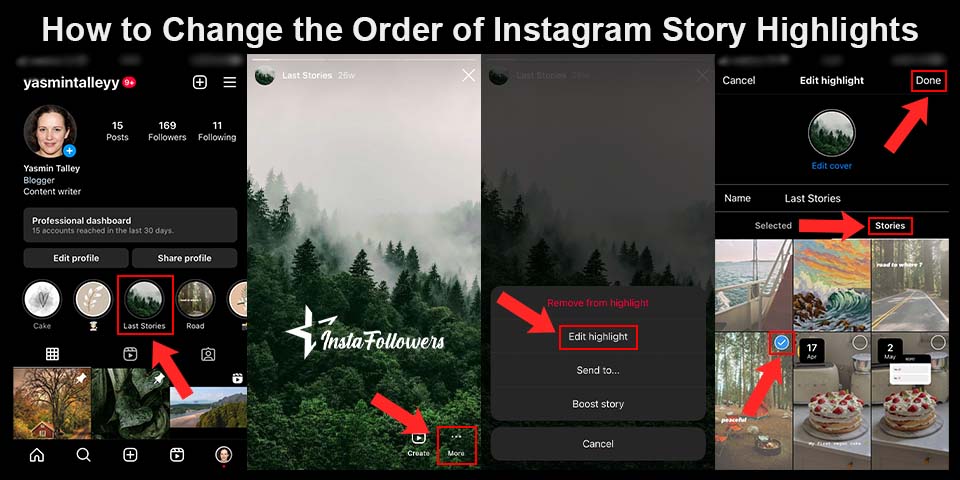
Rearranging Instagram Highlights works by updating highlights in the order you want them to appear.
Follow these steps:
- Go to your Instagram profile and tap the highlight you want to move to the front.
- Tap the More (three-dot) icon in the bottom-right corner.
- Select “Edit Highlight.”
- Tap the “Stories” section and add any story (it can be an old archived story).
- If you don’t want to post a new story publicly, you can add stories directly from your archive.
- If you don’t want to post a new story publicly, you can add stories directly from your archive.
- Tap “Done.”
This updates the highlight and moves it to the front. - Repeat the process for other highlights in the exact order you want them to appear.
- (Optional) Remove the added story afterward:
- Open the highlight again
- Tap the three dots
- Select Remove from Highlight
- Open the highlight again
Instagram orders highlights from most recently updated to least recently updated.
Important Limitations You Should Know
- Instagram Highlights are limited to 100 stories per highlight, according to Instagram Support.
- You cannot drag and drop highlights into a custom order.
- You cannot reorder stories inside a highlight. Stories appear in chronological order.
- There is no official way to export or transfer highlights to another account.
Any tools or guides claiming otherwise are inaccurate.
Why Reordering Instagram Highlights Matters
Reordering Instagram Highlights improves profile navigation and visual hierarchy.
When your most important highlights appear first, visitors are more likely to tap them, explore your content, and stay longer on your profile.

A TikTok video sits at 0 views for one of six reasons: it is still in TikTok's automated review (usually clears in 5 to 30 minutes), the video was fla...
Instagram usually blocks a new account for one of six reasons: you already have 5 accounts linked to the same email or phone number, you have 5 accoun...
This does not directly affect Instagram’s algorithm, but it indirectly improves engagement metrics, such as:
- Profile visits
- Story views
- Time spent on profile
- Content discovery
A well-organized highlight section creates a clearer brand message and stronger first impression.
Using Instagram Archive While Organizing Highlights
Instagram Archive protects your older stories while you reorganize highlights.
Archived stories remain private and accessible only to you, making them ideal for updating highlights without reposting content publicly.