Turning off Profile Views on TikTok removes mutual visibility between you and other users, allowing you to browse profiles anonymously without affecting your content reach or account performance.
TikTok includes a Profile Views feature that shows which users have visited your profile within the last 30 days. TikTok limits this visibility to users who have the feature enabled, creating a mutual system where visibility works both ways. TikTok disables this feature by default, and users must manually turn it on or off through privacy settings.
This guide explains what TikTok Profile Views are, how the feature works, how to turn it off step by step, and what changes after disabling it.
What Are TikTok Profile Views?
TikTok Profile Views is a privacy feature that displays which users have visited your profile within the past 30 days.
TikTok Profile Views shows profile visit activity only when both users have Profile View History enabled. TikTok designed this feature to help creators and users understand profile engagement rather than content performance.
How the Profile View Feature Works
The Profile View feature works as a two-way visibility system between users who enable it.
When Profile Views are turned on:
- TikTok shows a list of users who visited your profile.
- TikTok only displays users who also enabled Profile View History.
- TikTok lists visits from the last 30 days.
- TikTok reveals your visit when you view another enabled profile.
This system ensures that visibility is always mutual.
Who Can See That You Viewed Their Profile?
Only users who have Profile View History enabled can see that you visited their profile.
This rule applies in all cases:
- If both users enable the feature, profile visits appear.
- If either user disables the feature, no visit data appears.
- TikTok sends no notifications for profile visits.
Profile Views therefore operate silently and symmetrically.
Is TikTok Profile View History Enabled by Default?
TikTok Profile View History is disabled by default for all users.
Key points to know:
- TikTok may prompt new users to enable the feature.
- TikTok allows users to toggle the feature on or off at any time.
- TikTok removes all mutual visibility immediately after disabling it.
Users who prioritize privacy can safely keep this feature turned off without penalties.
How to Turn Off Profile Views on TikTok (Step by Step)
Turning off Profile Views on TikTok takes less than one minute and fully restores anonymous browsing.
Method 1: From Settings and Privacy
- Open TikTok and go to your Profile.
- Tap the three line menu (☰) in the top right corner.
- Select Settings and Privacy.
- Tap Privacy.
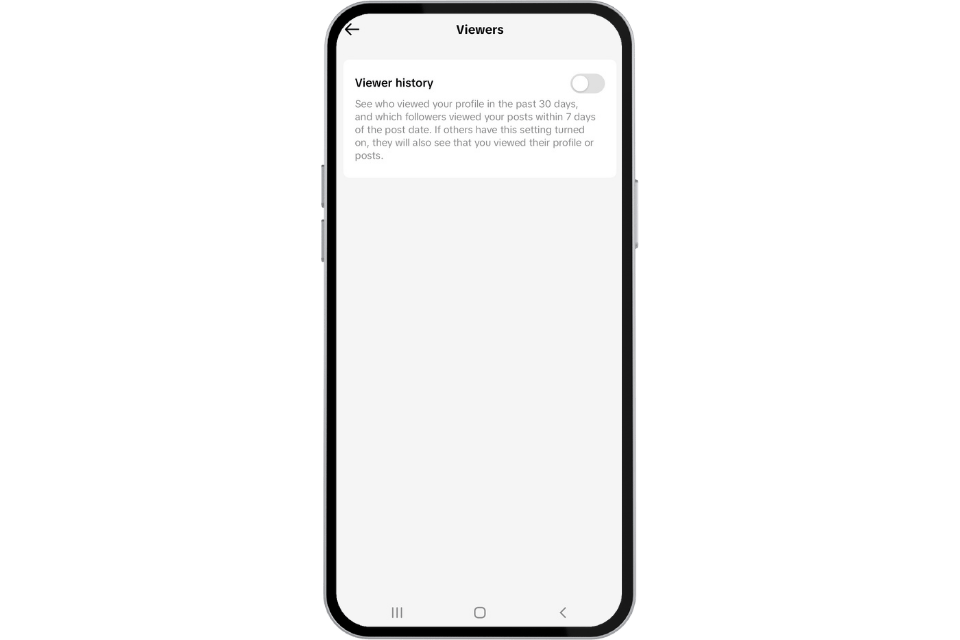
- Select Profile views.
- Toggle Profile View History off.
Once disabled, TikTok stops sharing and recording profile visit data.
Method 2: From the Profile Views Page
- Go to your Profile.
- Tap the footprint icon (if visible).
- Open Settings.
- Toggle Profile View History off.
This method is faster for users who actively check profile visits.
How to Verify That Profile Views Are Disabled
You can confirm that Profile Views are off directly in your privacy settings.
Verification steps:
- Go to Settings > Privacy > Profile views.
- Ensure the toggle is set to Off.
- Confirm the footprint icon disappears from your profile.
Once disabled, TikTok no longer logs profile visits going forward.
What Happens After You Turn Off Profile Views?
Disabling Profile Views increases privacy but removes access to visitor insights.
Can You Still See Who Viewed Your Profile?
No. TikTok removes:
- Visitor lists
- Profile view tracking
- Mutual visibility with other users
This applies even if the other user has the feature enabled.



Will Others Know You Turned It Off?
TikTok does not notify users when Profile Views are disabled.
However:
- Past visibility may suddenly stop.
- No alerts or system messages appear.
- Your activity simply disappears from view histories.
This makes the feature discreet and privacy-friendly.
Does Turning Off Profile Views Affect the TikTok Algorithm?
Turning off Profile Views does not affect TikTok’s algorithm, reach, or content performance.
TikTok separates:
- Profile visibility features
- Content ranking systems
Creators may lose behavioral insight, but engagement metrics remain unchanged.
How to Turn Profile Views Back On
Re enabling Profile Views restores mutual visibility and visitor tracking.
No. Creators on TikTok, Instagram, and YouTube cannot see how many times a specific person watched their video. They see aggregate view counts, engage...
Sometimes, but only in specific situations. TikTok stores drafts locally on your device, not on its servers, which means once the app data is gone the...
Steps:
- Open Profile.
- Tap ☰ Menu.
- Go to Settings and Privacy > Privacy.
- Select Profile views.
- Toggle the feature On.
TikTok begins tracking visits again from that moment forward.
Time Limits and Data Behavior
- TikTok tracks visits for 30 rolling days.
- TikTok does not restore data from periods when the feature was off.
- Frequent toggling can interrupt historical continuity.
Consistent activation ensures uninterrupted data access.
Extra Tips for Staying Anonymous on TikTok
Anonymity on TikTok improves when multiple privacy controls work together.
Adjust In App Privacy Settings
- Keep Profile Views off
- Disable Activity Status
- Limit interaction visibility
These settings reduce passive exposure.
Use a Secondary Account
A secondary account allows:
- Anonymous browsing
- Independent algorithm behavior
- Separation from your main creator identity
Many creators use this method for research.
Browse TikTok Without the App
Alternative options include:
- Viewing public profiles in a browser
- Avoiding likes, follows, and comments
- Using search instead of the For You Page
While no method guarantees total invisibility, combining these tactics significantly minimizes your digital footprint.
If I turn off profile views, does it negatively affect the view counts of the videos I share?
No, turning off Profile Views does not negatively affect the view counts of the videos you share. The setting only controls whether users can see who visited your profile it has no influence on how your content is ranked or distributed. TikTok views come from watch time, engagement, and relevance to user interests. Even with Profile Views disabled, your videos can reach the For You Page and perform normally as long as your content resonates.