TikTok’s standard rule is clear: you need 1,000 followers to access the live feature, and you need to be at least 18 years old. For most people, that’s where the search ends.
But the rule isn’t as absolute as it looks.
TikTok has introduced several alternative access paths over the past two years, and in 2026, there are five distinct methods that can get you into a live stream before you hit that 1,000 milestone. Some of them require an application. Some require a workaround. One is as simple as switching your account category. This guide covers all of them, including which methods work on iPhone and which work on Android.
What the Standard Requirement Actually Is
Before the workarounds: understand why the 1,000-follower requirement exists.



TikTok uses it as a baseline for accountability. Live features carry higher moderation complexity than recorded video: content is real-time, can’t be pre-reviewed, and reaches audiences immediately. The follower count acts as a rough proxy for whether an account has been active long enough to have some platform history.
The two conditions are:
- At least 1,000 followers
- Account holder must be 18 or older
Neither of these is negotiable through the standard path. But the standard path isn’t the only path.
Method 1: Apply for TikTok Live Studio Access
This is the most direct route and the one TikTok has officially built for creators who don’t meet the follower threshold.
TikTok Live Studio is a desktop streaming application. To access it without 1,000 followers, you fill out an access request form on the Live Studio site (https://www.tiktok.com/studio/download). TikTok reviews the application and grants initial access as a trial.
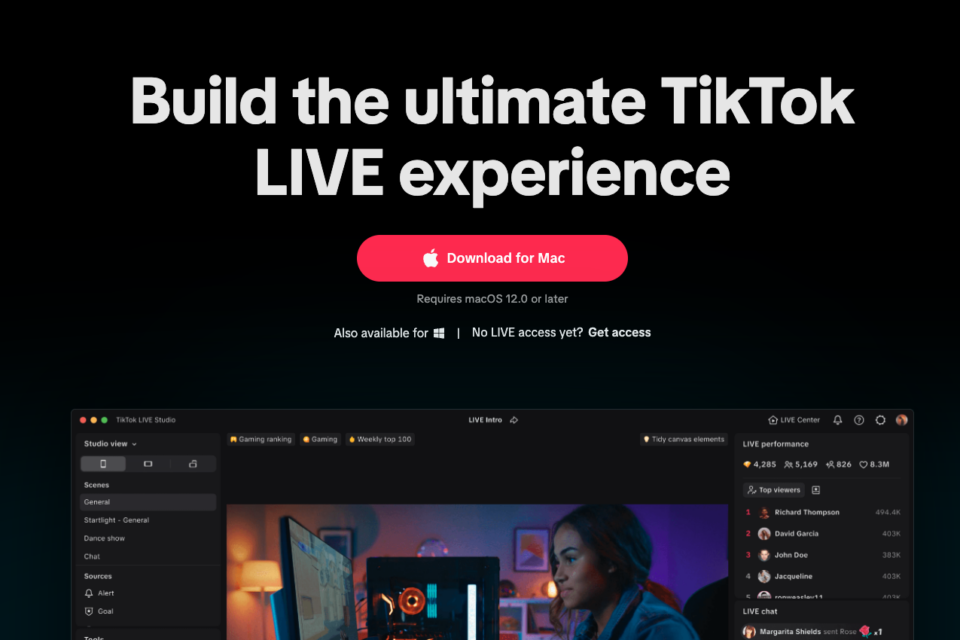
What the trial looks like:
- Initial access lasts 14 days
- During those 14 days, if you stream for more than 25 minutes on at least two separate occasions, your access extends to 180 days
- After 180 days, ongoing access depends on consistent streaming activity
This method is better suited for creators who are already streaming on other platforms (Twitch, YouTube Live) and want to add TikTok to their rotation. The application asks about your streaming history, so having that context is helpful.
Device compatibility: Live Studio is a desktop application, so it works on Mac and Windows regardless of your iPhone or Android setup. Your phone isn’t involved.
Method 2: Get Invited to Another Creator’s Live
TikTok’s multi-guest feature lets a live host invite viewers to join their stream. You appear on screen alongside the host, participating in the live even if your own account doesn’t have live access.
This means: if you know a creator who is already live and has 1,000 followers, they can invite you. You don’t need your own live permission for this.
How it works: The host opens a live stream, taps the “Invite” option in their live controls, and selects your username. You receive a notification and can accept to join. Your face appears in a split-screen with theirs.
This isn’t the same as running your own live, but it gets your content in front of a live audience and builds the follower count that eventually opens full access. Some creators use this as a deliberate strategy: participate in other creators’ lives, gain followers from that exposure, and reach 1,000 organically.
Device compatibility: Works on both iPhone and Android.
Method 3: Switch to a Business Account in the Gaming Category
This method has been circulating since at least 2024, and as of early 2026, multiple creators have confirmed it still works, though results aren’t guaranteed.
The process:
- Go to Settings and Privacy in your TikTok app
- Tap “Manage Account”
- Select “Switch to Business Account”
- When prompted to select your category, choose “Gaming”
Some accounts receive live access immediately after this switch. The theory is that TikTok has lower follower thresholds for business accounts in specific categories as part of an effort to attract professional creators in those niches.
Important caveats: Business accounts don’t have access to the full commercial music library. If music selection matters for your content, weigh that tradeoff before switching. Also, this method isn’t officially documented by TikTok, so it may become less reliable as the platform updates its systems.
Device compatibility: Works on both iPhone and Android.
Method 4: Use TikTok Live Events
TikTok Live Events is a feature that lets creators schedule and promote upcoming live streams directly within the app. As of 2026, access to Live Events doesn’t carry the same 1,000-follower requirement as standard live access.
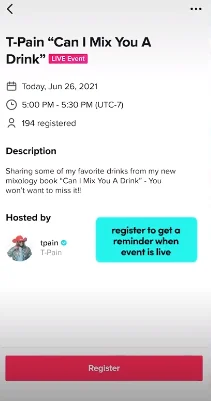
This path works differently from going live spontaneously. You create a scheduled event, TikTok promotes it to relevant users ahead of time, and at the scheduled time you start your stream through the Events framework.
How to set up a Live Event:
- Tap the “+” button to create a new post
- Select “LIVE” from the content options
- Look for the “Events” tab
- Set your date, time, and event title
- Submit for review
TikTok reviews scheduled events before they go live. The review process typically takes a few hours. Not every account will see this option immediately — it appears to roll out based on account activity and region.
Device compatibility: Works on both iPhone and Android.
Method 5: Contact TikTok Creator Support Directly
This is the most time-consuming method and the least reliable, but it has worked for some creators.
If you have a compelling reason for needing live access before 1,000 followers — you’re promoting a legitimate event, you have a verified presence on another platform, you’re working with a brand — you can contact TikTok through the Creator Portal support system and request early access directly.
The response rate is inconsistent. TikTok’s support infrastructure handles a high volume and doesn’t prioritize these requests. But for creators with a genuine use case, it’s worth attempting alongside the other methods.
How to reach support: Go to your profile, tap the three-line menu, go to Settings and Privacy, then Support and select “Report a Problem.” Navigate to the creator tools section and describe your situation.
iPhone vs Android: What’s Different
Several of the methods above work on both platforms, but there are some practical differences:
Live Studio (Method 1) is desktop-only, so the iPhone/Android distinction doesn’t apply. Once you have access via Live Studio, you can manage some settings through the mobile app on either platform.
Methods 2, 3, 4, and 5 all work on both iPhone and Android. The interface is slightly different (iOS tends to have newer features rolled out a few weeks earlier than Android), but the core functionality is identical.
One thing that catches people: if you’ve set up live access through the business account method (Method 3) on Android and it isn’t showing up, try clearing your cache and restarting the app before assuming the method hasn’t worked.
What to Do Once You Have Live Access
Getting live access is one thing. Getting people to show up is another.
A few things that make early TikTok lives more successful:
Post about it beforehand. A short video announcing your first live, even just 15 seconds, seeds the expectation. TikTok also allows you to pin a live announcement to your profile temporarily.
Pick a consistent time. Irregular live schedules mean irregular audiences. Committing to a specific day and time each week is what builds a live regulars group.
Start with a short duration. A 20-30 minute live is easier to sustain quality-wise than a 90-minute one, especially early on. TikTok rewards completion rates, and a shorter live where the audience stays is better than a longer one with high drop-off.
Engage directly. Calling out usernames in comments, answering questions audibly, and reacting to viewer inputs are the mechanics that keep people in a live stream longer than a few minutes.
How to Reach 1,000 Followers Faster (The Long-Term Fix)
All five methods above get you into live streaming sooner. But the 1,000-follower mark is still worth reaching on its own terms: it unlocks “Searches by Followers” in TikTok’s Creator Search Insights tool, opens access to more monetization pathways, and makes standard live access reliable without workarounds.
The fastest organic routes to 1,000 followers are consistent posting in a defined niche (3-4 times per week outperforms daily posting in most studies), participating in trending sounds and formats within the first 24-48 hours of a trend appearing, and engaging with comments on your own posts in the first hour after publishing.
Following other accounts in your niche is another tactic many creators combine with these strategies. Before attempting it at scale, it is worth knowing TikTok’s exact limits our guide to how to follow all people on TikTok covers the daily and total caps, how the platform enforces them, and which alternative growth approaches are more reliable in 2026.
For creators who want to accelerate that process, Famety’s TikTok followers service lets accounts establish baseline credibility while they build organic content. When you combine a meaningful follower count with consistent content, the algorithm’s early-distribution decisions tend to compound faster than starting from zero.
One thing worth knowing: TikTok has a built-in system that can cause automatic unfollows in certain circumstances. If you’re wondering why TikTok sometimes unfollows accounts automatically, that’s worth reading before you’re confused about why your follower count fluctuates.
Frequently Asked Questions
Can you go live on TikTok with less than 1,000 followers in 2026?
Yes. TikTok Live Studio access (via application), the multi-guest invite method, the business account Gaming category switch, TikTok Live Events, and direct creator support requests are all paths that can get you live before the 1,000-follower threshold.
Does the business account trick still work in 2026?
As of early 2026, multiple creators report it still works, though it isn’t guaranteed. The process: switch to a Business Account and select “Gaming” as your category. Some accounts receive live access immediately.
What’s TikTok Live Studio and how do I apply?
Live Studio is TikTok’s desktop streaming software. You apply at livestudio.tiktok.com. Initial access is a 14-day trial. Stream for 25+ minutes on two separate days during that trial and access extends to 180 days.
Is live access different on iPhone vs Android?
The methods are the same on both platforms. iOS sometimes receives new features slightly before Android, but as of 2026 all five methods work on both operating systems.
How old do you need to be to go live on TikTok?
18 years old is the minimum, regardless of follower count. This requirement applies even if you use one of the alternative access methods above.